Best way to keep reference images portable in shared worksheets?

Best way to keep reference images portable in shared worksheets? - Embedding or attaching externally generated diagrams in SMath files - Messages

#1 Posted: 7/14/2026 10:05:41 AM
ChatGPT Image

ChatGPT Image

0 likes in 1 posts.

Group: User

I am preparing SMath worksheets that include externally generated reference diagrams. Some draft visuals come from a ChatGPT Image Generator before I add dimensions and calculation notes in SMath.

What is the recommended way to keep these images portable when sharing an .sm file? Does inserting a bitmap embed it in the worksheet, or should the original PNG/JPG also be attached? I want recipients to see the diagrams without relying on a local file path.
ChatGPT Image — https://www.chatgptimage.app
#2 Posted: 7/14/2026 7:31:55 PM
overlord

overlord

598 likes in 1,379 posts.

Group: Moderator

Best and fastest way is to embed pictures in to smath file.
But this method will make your file very big depending on pictures.
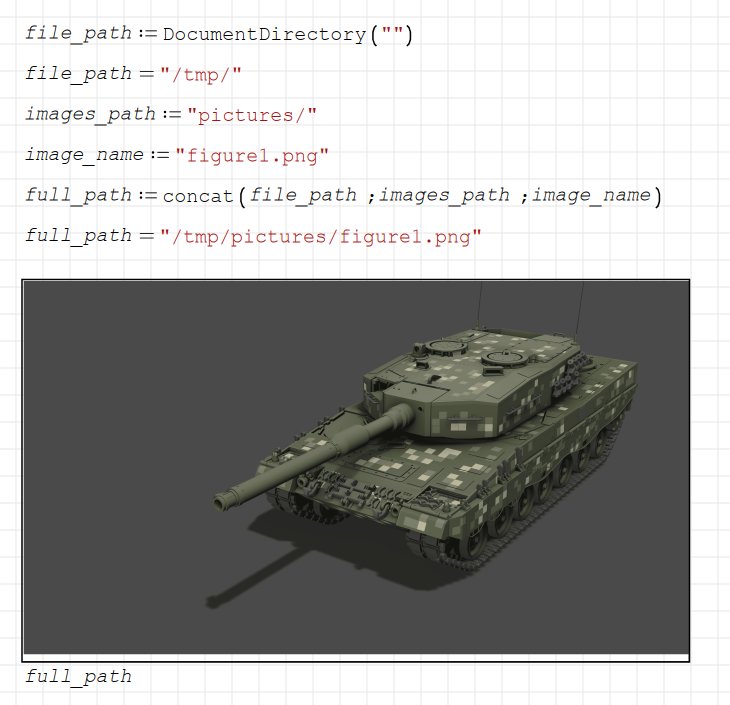
Another way is to use DocumentDirectory() function.
Keeping your pictures out of smath file and relying on dynamic paths is available.
See the example below

Regards

2026-07-14_22-31.png
Edited 7/14/2026 7:32:41 PM
1 users liked this post
Alvaro 7/15/2026 11:15:52 AM
#3 Posted: 7/22/2026 9:44:04 PM
Martin Kraska

Martin Kraska

1,353 likes in 2,265 posts.

Group: Moderator

If the image is static, then just paste it to the canvas and resize as required.

If the image may be externally modified, the way shown above is convenient.

If you want to edit the image in paint or any other editor, then you might use the image region as for external files, while keeping the placeholder empty. Then you can set the file format in the context menu and launch an editor.
In my Introduction to SMath Studio I recommend this for quick sketches.

https://doi.org/10.25933/opus4-3370

The benefit is that it is embedded in the worksheet (no external file needed) but still editable.
Also note that it is convienient to annotate sketches using formula regions on top of the image.
Technische Mechanik mit SMath Studio: https://link.springer.com/book/10.1007/978-3-658-50592-9

  • New Posts
  • No New Posts